
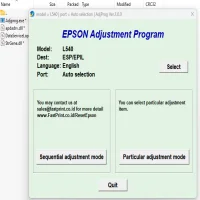
Latest Version
Download NowMore About Epson L540 Adjustment Program ( Resetter )
Epson L540 Adjustment Program (Resetter): A Comprehensive Guide
The Epson L540 printer is a reliable choice for both home and office use, known for its efficient ink tank system and exceptional printing quality. However, like any other printer, the L540 may eventually face issues such as the "Waste Ink Pad" error or the need for general maintenance, which may require a reset. The Epson L540 Adjustment Program (also known as the resetter) is an essential tool designed to address these problems by restoring your printer to its optimal condition.
What is the Epson L540 Adjustment Program?
The Epson L540 Adjustment Program is a software tool that allows users to reset the printer’s internal settings, clear error codes, and perform various maintenance functions. This program is especially useful when the printer displays an error message related to waste ink pads, print head issues, or when it needs to be recalibrated.
The primary function of the Epson L540 resetter is to reset the internal counters, particularly those tracking the waste ink pads' capacity. Over time, these pads can fill up, causing the printer to display an error message. Using the adjustment program, you can clear the waste ink pad counter, preventing unnecessary downtime.
Why Do You Need the Adjustment Program?
-
Waste Ink Pad Reset: One of the most common errors with the Epson L540 is the waste ink pad reaching its capacity. As the ink pads absorb excess ink during printing, they can become saturated, triggering an error message. The adjustment program helps you reset the counter and avoid costly repairs.
-
Error Code Fixing: Sometimes, Epson printers can display error codes that cannot be cleared through conventional means. The adjustment program allows you to reset these errors and get your printer back up and running.
-
Printer Maintenance: Over time, your printer may require specific maintenance tasks such as print head alignment, nozzle check, or cleaning. The adjustment program enables you to perform these tasks directly from your computer without the need to use the printer's onboard menu.
-
Improved Performance: By resetting certain counters, your Epson L540 may operate more efficiently. The adjustment program helps maintain the printer’s performance, ensuring it runs smoothly and avoids recurring issues.
How to Use the Epson L540 Adjustment Program?
Before you proceed with using the adjustment program, it is essential to follow a few preliminary steps to ensure a successful reset:
Step 1: Download the Adjustment Program
The Epson L540 Adjustment Program is not officially available through the Epson website, so it must be downloaded from a reliable third-party source. Ensure you are downloading from a trustworthy site to avoid downloading malicious software.
Step 2: Install the Program
Once the program is downloaded, run the installer and follow the on-screen instructions to install the software on your computer. It is important to close all other applications before installation to avoid any interruptions.
Step 3: Connect the Printer
Ensure that your Epson L540 is connected to the computer via USB cable and powered on. The adjustment program will need to communicate with the printer to reset its internal settings.
Step 4: Run the Adjustment Program
Open the adjustment program and select your printer model (Epson L540). In the software, you will find a variety of options such as "Waste Ink Pad Reset," "Head Cleaning," and "Print Head Alignment." Choose the specific function you want to execute.
Step 5: Select the Reset Option
To reset the waste ink pad counter, choose the appropriate option in the program. Follow the instructions displayed on your screen. Be sure to review the instructions carefully and ensure the printer is not in use during the reset process.
Step 6: Complete the Reset
Once the reset process is completed, the program will notify you. At this point, you can restart your printer. The error codes should be cleared, and the waste ink pad counter will be reset.
Tips for Using the Epson L540 Adjustment Program
-
Backup Your Printer Settings: Before using the adjustment program, it is a good idea to make a note of your current printer settings, such as print quality and paper settings. The reset process may revert some settings to default.
-
Be Cautious: Since the Epson L540 Adjustment Program is not officially supported by Epson, there is a risk of using outdated or corrupt software. Always ensure the program you are downloading is up-to-date and compatible with your printer model.
-
Regular Maintenance: To prolong the lifespan of your Epson L540, use the adjustment program for regular maintenance tasks, such as print head cleaning and alignment. These tasks help maintain the quality of prints and prevent major issues.
-
Use Caution with Waste Ink Pads: Even after resetting the waste ink pad counter, the physical waste ink pads may still be saturated. If the problem persists, consider replacing the waste ink pads or seeking professional assistance.
Conclusion
The Epson L540 Adjustment Program is an invaluable tool for resolving common issues that arise with your printer, such as waste ink pad errors and maintenance tasks. By following the steps outlined in this guide, you can perform a reset and restore your printer’s functionality with ease. However, always exercise caution when using third-party software, and make sure you are using a trusted version of the adjustment program.
With proper care and maintenance, your Epson L540 can continue to deliver high-quality prints and perform efficiently for years to come.
Rate the App
User Reviews





Popular Apps








