
Latest Version
Download NowMore About Epson Stylus CX1500 Adjustment Program
Epson Stylus CX1500 Adjustment Program: A Comprehensive Guide
The Epson Stylus CX1500 is a reliable inkjet all-in-one printer, widely appreciated for its efficient printing, scanning, and copying functions. However, like any printer, it occasionally requires maintenance to ensure optimal performance. One of the most crucial tools for keeping the Epson Stylus CX1500 running smoothly is the Adjustment Program.
This program is a powerful software tool developed by Epson to resolve common issues, recalibrate the printer, and maintain its longevity. In this article, we’ll explore what the Epson Stylus CX1500 Adjustment Program is, how to use it, and why it's an essential part of printer upkeep.
What is the Epson Stylus CX1500 Adjustment Program?
The Epson Stylus CX1500 Adjustment Program is a utility that allows users to make various adjustments to their printer's internal components. It can help fix problems related to ink flow, paper feeding, head alignment, and more. Additionally, it allows users to reset certain printer parameters, such as the waste ink counter, which can become full over time, potentially affecting the printer's performance.
Epson’s Adjustment Program is typically used for troubleshooting issues that can’t be resolved by conventional means, like cleaning the printhead or replacing cartridges. It’s an indispensable tool for anyone who wants to extend the life of their printer and keep it functioning at its best.
Key Features of the Epson Stylus CX1500 Adjustment Program
-
Waste Ink Counter Reset: One of the most common problems with Epson printers is the "waste ink pad full" error. This occurs when the printer's waste ink pads are full and need to be reset. The Adjustment Program allows you to reset the waste ink counter and avoid the error, allowing the printer to continue operating normally.
-
Print Head Cleaning: Over time, inkjet print heads can become clogged with dried ink, leading to poor print quality. The Adjustment Program offers advanced cleaning options to remove stubborn blockages and improve ink flow, which can help restore print quality.
-
Ink Level Calibration: The program can also help you calibrate ink levels to ensure accurate ink usage. This can prevent wastage and improve print quality by ensuring the correct amount of ink is used during each print job.
-
Paper Feed Adjustment: Paper feeding issues are common in inkjet printers, especially when the rollers or feed mechanism become dirty or misaligned. The Adjustment Program provides the tools necessary to realign the paper feed system and ensure smooth paper handling.
-
Head Alignment: Proper head alignment is crucial for achieving crisp, clear prints. The Adjustment Program allows you to adjust the print head alignment to improve the accuracy and clarity of your prints.
-
Extended Diagnostics: The software can run diagnostics on your Epson Stylus CX1500 to detect any underlying issues that might affect its performance. This feature allows users to identify potential problems before they cause significant damage to the printer.
How to Use the Epson Stylus CX1500 Adjustment Program
-
Download and Install: The first step is to download the Epson Stylus CX1500 Adjustment Program from a trusted source, such as Epson’s official website or other authorized platforms. Be cautious of third-party websites that may offer counterfeit versions of the software.
-
Connect Your Printer: Ensure your Epson Stylus CX1500 is connected to your computer via USB or network connection. The Adjustment Program will not function unless the printer is properly connected.
-
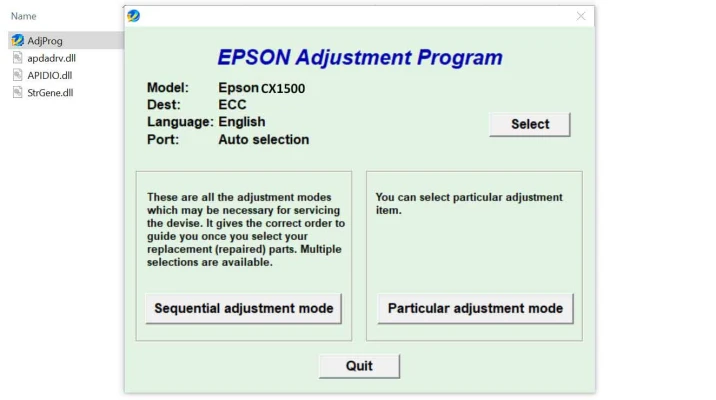
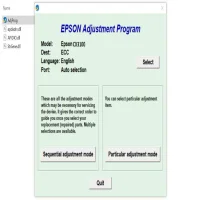
Launch the Program: Once installed, open the Epson Stylus CX1500 Adjustment Program on your computer. You may be required to enter a password or authorization key to access the program’s full features.
-
Select the Desired Adjustment: Choose the function you want to perform, whether it’s resetting the waste ink counter, cleaning the printhead, or adjusting the paper feed. Follow the on-screen instructions for each process.
-
Execute and Monitor: Once you select an adjustment, execute the process and monitor the printer as it completes the task. Be patient, as some tasks, like cleaning or head alignment, may take several minutes.
-
Test the Results: After completing the adjustments, print a test page to check for improvements. This will help you determine if the issue has been resolved and if your printer is working optimally.
Why Use the Epson Stylus CX1500 Adjustment Program?
- Prevents Downtime: Regular use of the Adjustment Program can prevent common issues from escalating, saving you time and frustration.
- Maintains Print Quality: By resetting the waste ink counter and performing head cleaning, you ensure that your printer produces high-quality prints consistently.
- Cost-Effective: Instead of taking your printer to a repair center for minor issues, you can use the Adjustment Program to fix problems at home, saving you money on repairs and service fees.
- Extends Printer Lifespan: Proper maintenance, including using the Adjustment Program, helps to extend the overall lifespan of your printer, ensuring it continues to perform well for years.
Conclusion
The Epson Stylus CX1500 Adjustment Program is an invaluable tool for Epson printer owners. Whether you're dealing with issues related to waste ink, print head blockages, or paper feed misalignments, this program allows you to make precise adjustments and keep your printer running like new. With its easy-to-use interface and robust set of features, the Adjustment Program ensures that you can take control of your printer’s maintenance and avoid costly repairs.
By regularly using the Epson Stylus CX1500 Adjustment Program, you ensure your printer continues to produce high-quality prints and operates efficiently for the long term.
Rate the App
User Reviews








Popular Apps








