

Latest Version
Download NowMore About Epson Stylus CX3100 Adjustment Program
Epson Stylus CX3100 Adjustment Program: A Comprehensive Guide
The Epson Stylus CX3100 is a versatile and reliable all-in-one printer that serves as a staple for home and office printing. However, like all printers, it can face issues such as poor print quality, paper feed errors, or even the dreaded "printer error" message. If you're experiencing these or other similar problems, it might be time to use the Epson Stylus CX3100 Adjustment Program to restore your printer to its optimal performance.
In this article, we will explore what the Epson Stylus CX3100 Adjustment Program is, why it's important, and how you can use it to solve common printer problems.
What is the Epson Stylus CX3100 Adjustment Program?
The Epson Stylus CX3100 Adjustment Program is a software tool specifically designed to fix various printer-related issues by resetting the internal settings of the printer. This tool is primarily used to address problems that arise from the printer’s waste ink pads, ink cartridge issues, or paper jams that can result in error codes and misalignment.
The Adjustment Program is not part of the regular software package provided by Epson, and it is typically used by service professionals or technically advanced users. However, with the right guidance, anyone can utilize this program to help maintain their printer in top condition.
Common Issues Solved by the Adjustment Program
-
Waste Ink Pad Overflow: One of the most common issues that printers face, including the Epson Stylus CX3100, is the overflow of waste ink pads. These pads are responsible for absorbing excess ink during cleaning cycles. Over time, they can become saturated, which may trigger an error message or prevent the printer from functioning properly. The Adjustment Program resets the waste ink counter, allowing the printer to resume normal operation.
-
Error Codes: The printer might display error codes like "Parts inside your printer are at the end of their service life," signaling a problem with internal components, including the waste ink pads. The Epson Adjustment Program clears these error codes and helps resolve the issue.
-
Print Head Alignment and Cleaning: Another common use of the Adjustment Program is to reset or re-align the print heads. Misalignment can result in faded, skewed, or incomplete prints. The program allows you to perform various maintenance tasks, including cleaning the print heads, which can help restore print quality.
-
Ink Cartridge Recognition Issues: Sometimes, your Epson printer might not recognize installed ink cartridges correctly, either because of a software glitch or a reset failure. The Adjustment Program can help recalibrate the printer’s software to better detect and use the installed ink cartridges.
-
Paper Jam Issues: If your printer has experienced frequent paper jams, even after performing the usual troubleshooting steps, the Adjustment Program may help reset or recalibrate the feed mechanism, ensuring smoother paper handling.
How to Use the Epson Stylus CX3100 Adjustment Program
Before you proceed with using the Epson Stylus CX3100 Adjustment Program, keep in mind that it is intended for advanced users. Incorrect use of the program can lead to further issues. It’s recommended to follow the instructions carefully and back up any essential data before making adjustments.
Step-by-Step Guide:
-
Download the Adjustment Program:
- The Epson Stylus CX3100 Adjustment Program is not available on the official Epson website for public download. However, you can find it on third-party websites or forums that specialize in printer repair software. Make sure to download it from a reliable source to avoid malicious software.
-
Install the Program:
- Once downloaded, extract the files and run the installation program. Follow the on-screen instructions to complete the installation.
-
Connect Your Printer:
- Ensure that your Epson Stylus CX3100 is properly connected to your computer via USB or a network. Power the printer on before proceeding.
-
Run the Adjustment Program:
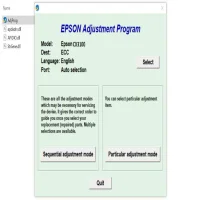
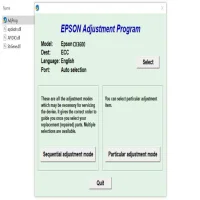
- Launch the Epson Stylus CX3100 Adjustment Program. The software should automatically detect your printer.
-
Select the Correct Function:
- The program will present you with a list of options. Choose the function related to your issue, such as "Waste Ink Pad Reset," "Print Head Alignment," or "Ink Cartridge Reset."
-
Follow the Instructions:
- The program will guide you through the necessary steps. If you're resetting the waste ink pads, the program will prompt you to confirm the action before proceeding.
-
Complete the Reset:
- After following the on-screen instructions, the printer should complete the reset or maintenance task. Restart the printer and perform a test print to verify that the problem has been resolved.
Precautions and Considerations
-
Backup Your Data: Although this tool is designed to fix specific issues, it's always a good idea to back up your documents and printer settings beforehand.
-
Use the Program Responsibly: Misusing the adjustment tool, especially when resetting parts of the printer, can lead to unintended consequences. Only use it for the specific problems outlined in the instructions.
-
Seek Professional Help if Unsure: If you're unsure about using the Adjustment Program, it may be better to contact an Epson service center or a professional technician to handle the issue.
Conclusion
The Epson Stylus CX3100 Adjustment Program is an essential tool for those dealing with common printer problems such as waste ink pad overflow, error codes, misaligned print heads, or ink cartridge issues. By using the program responsibly, users can maintain their printers and ensure they continue to function properly for years to come. Whether you're a DIY enthusiast or someone seeking to avoid expensive repair bills, this software provides an easy and effective solution for printer maintenance.
Rate the App
User Reviews






Popular Apps








