

Latest Version
Download NowMore About Epson Stylus CX6900F Adjustment Program
Epson Stylus CX6900F Adjustment Program: A Comprehensive Guide
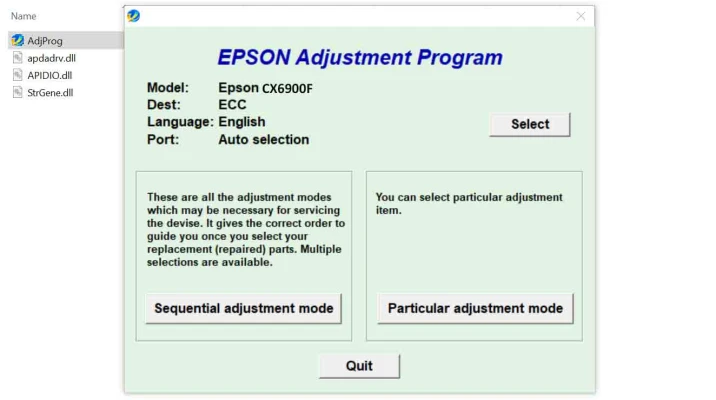
The Epson Stylus CX6900F is a multifunction printer that delivers high-quality printing, scanning, and copying. While it serves as a reliable tool for both home and office tasks, over time, like any other printer, it may require some maintenance or adjustments to continue functioning at peak performance. One crucial aspect of keeping your Epson Stylus CX6900F in top shape is using the Epson Stylus CX6900F Adjustment Program.
What Is the Epson Stylus CX6900F Adjustment Program?
The Epson Stylus CX6900F Adjustment Program is a specialized software tool that helps manage and reset various settings in your printer. This program is typically used when your printer begins to display warning messages such as "Waste Ink Pad is Full" or "Service Required," indicating that certain parts of the printer need to be reset or maintained.
The primary function of this program is to adjust and reset internal printer counters, including those for the waste ink pad. It is also useful for other tasks such as cleaning the print heads, recalibrating the printer, and even resetting the ink pad counter after servicing.
Key Features of the Epson Stylus CX6900F Adjustment Program
-
Waste Ink Pad Reset: One of the most common reasons for using the adjustment program is to reset the waste ink pad counter. When the printer accumulates a certain amount of ink waste during printing and cleaning, it triggers a warning to replace the ink pad. This program allows you to reset the counter after maintenance, ensuring smooth operation.
-
Printer Head Cleaning and Maintenance: The program can be used to perform advanced print head cleaning tasks, ensuring that your printouts remain sharp and clear.
-
Ink Counter Reset: If the ink cartridge usage counter needs resetting for various reasons, this program can handle that.
-
Error Code Reset: In cases of persistent error codes that cannot be cleared by simple methods, the program can help to reset the printer and clear out specific errors.
-
Calibration Settings: The software allows for the recalibration of various printer settings to ensure that the output meets the required standards.
How to Use the Epson Stylus CX6900F Adjustment Program
-
Download and Install the Program: The Epson Stylus CX6900F Adjustment Program is not officially available through the Epson website for consumers but can be downloaded from third-party sources. Ensure that you download it from a reputable website to avoid malware or unwanted software.
-
Connect Your Printer: Make sure that the printer is properly connected to your computer via USB or network. Turn on the printer.
-
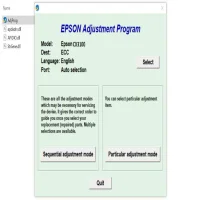
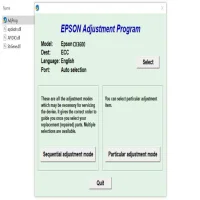
Launch the Adjustment Program: Open the program on your computer. If prompted, select the correct model (Epson Stylus CX6900F).
-
Choose the Reset Option: Depending on the issue you need to address, choose the appropriate reset or adjustment option. For example, if you're dealing with the waste ink pad, select the "Waste Ink Pad Reset" option.
-
Follow the On-Screen Instructions: The program will guide you through the necessary steps. It may ask you to restart your printer or perform a specific task like cleaning the print head or resetting an ink counter.
-
Complete the Process: After following all instructions, the program will notify you that the reset or adjustment has been successfully completed.
Precautions to Take
-
Use with Caution: The Epson Stylus CX6900F Adjustment Program is a powerful tool, but it should be used with caution. If used incorrectly, it can potentially cause damage to your printer. Always follow the instructions carefully.
-
Backup Important Data: Before using any reset or maintenance features, ensure that you back up important files or data related to the printer, especially custom settings or configurations.
-
Official Support: If you are unsure about performing the adjustments yourself, consider reaching out to Epson's official support for assistance.
Why Is the Epson Stylus CX6900F Adjustment Program Important?
Maintaining your printer with the Adjustment Program ensures that it continues to work efficiently. By resetting the waste ink counter, cleaning the print head, and addressing errors, you prolong the lifespan of your Epson Stylus CX6900F and ensure that it delivers optimal print quality over time.
In conclusion, the Epson Stylus CX6900F Adjustment Program is an essential tool for maintaining your printer, particularly when it encounters specific error codes or warnings. When used correctly, it helps ensure that your printer continues to perform at its best and saves you from costly repairs or replacements.
Rate the App
User Reviews







Popular Apps








