

Latest Version
Download NowMore About Epson Stylus CX3650 Adjustment Program
Epson Stylus CX3650 Adjustment Program: A Comprehensive Guide
The Epson Stylus CX3650, a versatile all-in-one inkjet printer, offers efficient printing, scanning, and copying for personal and small office use. However, like all printers, it may encounter technical issues over time, such as print quality degradation, cartridge recognition errors, or the infamous "waste ink pad" issue. When such problems arise, users may be unable to solve them using standard troubleshooting methods. This is where the Epson Stylus CX3650 Adjustment Program comes into play.
What Is the Epson Stylus CX3650 Adjustment Program?
The Epson Stylus CX3650 Adjustment Program is a specialized software tool designed to reset certain functions of the printer, allowing it to recover from specific errors and malfunction states that typically occur during prolonged use. The program mainly targets issues like overflow of ink waste pads, printer head misalignment, or errors caused by the printer's internal settings. It is a handy tool for those who want to extend the life of their printer and avoid costly repairs.
Key Features of the Epson Stylus CX3650 Adjustment Program:
-
Reset Waste Ink Pad Counter: One of the most common issues with Epson printers is the waste ink pad, which accumulates ink during regular printing and cleaning cycles. When the pad reaches its limit, the printer may stop working or show an error message. The Adjustment Program allows you to reset this counter, effectively "restarting" the printer's waste ink system and making it functional again.
-
Head Cleaning and Alignment: The program helps with head cleaning procedures and alignment, ensuring that your prints come out with crisp, clear text and images. It assists in diagnosing print quality issues and gives you the option to perform nozzle checks and align the print head manually.
-
Reset Ink Cartridge Counter: If the printer detects that the ink cartridges have been replaced, it may require an adjustment to reset the ink counter. The Adjustment Program helps you reset this counter, enabling the printer to recognize new ink levels and function properly.
-
Preventing Printer Errors: When the printer encounters internal errors, such as overuse of the waste ink pad or printer head misalignment, the Adjustment Program is often the quickest way to solve the issue. It eliminates the need for complicated, time-consuming repairs.
-
Custom Settings: For more advanced users, the program also allows you to adjust specific settings within the printer to optimize its performance. You can tweak print speed, resolution, and other parameters to suit your needs.
How to Use the Epson Stylus CX3650 Adjustment Program
-
Download the Software: First, search for the Epson Stylus CX3650 Adjustment Program online. It is available from various websites that specialize in printer utilities. Make sure to download the program from a reputable source to avoid potential malware.
-
Install the Program: Once the file is downloaded, extract and run the installation file. Follow the on-screen prompts to install the program on your computer. It is important to make sure that the printer is connected and powered on during the installation process.
-
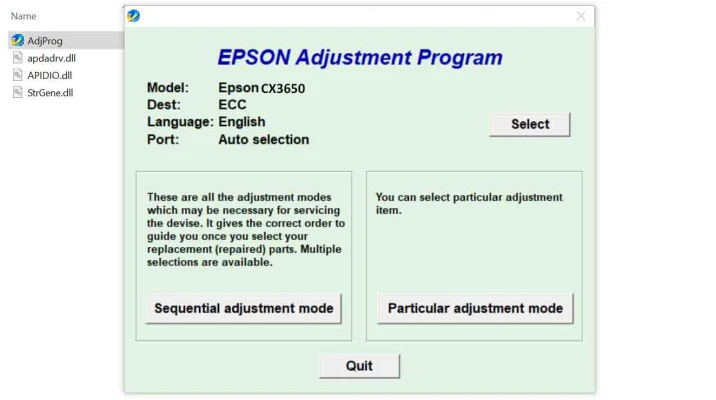
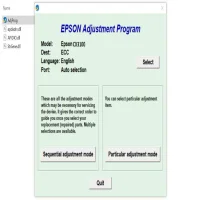
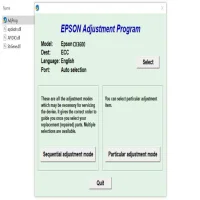
Run the Program: After installation, launch the Epson Adjustment Program. The interface will provide a variety of options to adjust or reset different components of your printer. Select the necessary function (e.g., Waste Ink Pad Reset, Head Cleaning) and follow the instructions carefully.
-
Perform Reset or Adjustments: Once you choose the required function, the program will guide you through the process. For example, if you are resetting the waste ink counter, you will be asked to confirm the action before proceeding. The software will perform the necessary adjustments automatically.
-
Complete the Process: After the process is complete, restart your Epson Stylus CX3650 printer to apply the changes. If everything has been done correctly, the printer should be fully functional again, and the error messages should no longer appear.
Important Notes and Warnings
-
Caution on Waste Ink Pads: While resetting the waste ink pad counter can resolve many issues, it does not physically empty the waste ink pads. Over time, these pads can become saturated with ink, and resetting them repeatedly may cause ink spillage. It is recommended to replace the pads when necessary.
-
Software Compatibility: The Epson Stylus CX3650 Adjustment Program may only be compatible with certain operating systems. Always verify that the version you're downloading is suitable for your computer's OS.
-
Risk of Void Warranty: If your printer is still under warranty, using third-party software tools like the Adjustment Program may void your warranty. It is advisable to consult with Epson's customer service before proceeding with such adjustments if you are concerned about warranty coverage.
Conclusion
The Epson Stylus CX3650 Adjustment Program is a valuable tool for users who want to troubleshoot and resolve common printer issues without the need for expensive repairs. By resetting counters, cleaning heads, and adjusting printer settings, it allows the printer to regain its functionality, ensuring continued reliable performance. However, it should be used with caution, particularly when dealing with the waste ink pads, as improper usage could cause long-term damage. As always, be sure to download the software from trusted sources and follow the instructions carefully for the best results.
Rate the App
User Reviews








Popular Apps








